Unityで万有引力
Unityでは、rigidbodyコンポーネントをオブジェクトにつけることで物理演算を適用させられる。rigidbodyコンポーネントにはgravityというチェックボックスがあり、チェックするとその物体は重力で下に落ちるようになる。しかし、画面中央に表示した星に物が落ちていく状況など、重力が下方向に働いてほしくない場面もある。この記事では簡単に万有引力を実装するコンポーネントのC#コード例を載せる。
参考にしたもの
- [https://n-codelabo.jp/programming/column/article09/:title] Unityの知識がVRCで少しいじった程度だったので、思い出すために読んだ
- [https://qiita.com/ga-mi-_qiita/items/2c7a796565c1aa8194dd:title] Mathf.Pow関数、初速設定などを参考にした
- [https://qiita.com/kugipanti/items/ad538a937118822c773c:title] メインの実装はこの方の記事をもとに、惑星と衛星の主客を逆に改変して衛星側につけるコンポーネントとした
- [https://tech.pjin.jp/blog/2022/08/24/unity-input-move:title] キーによる操作の参考にした
- ChatGPT3.5先生 C#の基本的な質問をあびせたり、上の記事で出てきたコードの解説や書き直しをさせた
コード例
using System.Collections;
using System.Collections.Generic;
using UnityEngine;

public class Gravity : MonoBehaviour {
    //万有引力
    public static float G = 6.67259f * Mathf.Pow(10,-11); //万有引力定数6.67259×10^-11
    //public GameObject satellite = null;の行は、このスクリプトが衛星にアペンドされるものであり、thisで参照できるため必要ない
    Rigidbody satelliteRig = null;//惑星を回る人工衛星のゲームオブジェクトを初期化
    public GameObject earth = null; //重力源のゲームオブジェクトを初期化
    Rigidbody earthRig = null; //重力源のゲームオブジェクトのRigidboodyコンポーネントを初期化

    //初速
    public Vector3 v0 = new Vector3(0, 0, 0);//空のベクトルを作成

    //最初に一回だけ実行されるスクリプト
    void Start () {
        //万有引力
        satelliteRig = this.GetComponent<Rigidbody>();//アペンドされたオブジェクトからRigidbodyコンポーネントを呼び出してくる
        earthRig = earth.GetComponent<Rigidbody>();//重力源からRigidbodyコンポーネントを呼び出してくる

        //初速
        satelliteRig.AddForce(v0, ForceMode.VelocityChange);//衛星に初速を与える
    }

    //フレーム毎に実行されるスクリプト
    void Update () {
        Vector3 vec_direction = earth.transform.position - this.transform.position; //衛星から見た地球の方向ベクトルを計算
        Vector3 Univ_gravity = G * vec_direction.normalized * (earthRig.mass * satelliteRig.mass) / (vec_direction.sqrMagnitude); //万有引力を計算
        satelliteRig.AddForce(Univ_gravity); //衛星に万有引力をかける
    }
}
使い方
- 重力源となるオブジェクトを作り、オブジェクトを選択した状態でInspector viewのadd componentからrigidbodyコンポーネントを作成する。重力源は固定したいため、rigidbodyコンポーネントの設定から、Use Gravity(下に落ちるようにする)のチェックを外し、Is Kinematic(物理演算を無視し、操作がない限り空間に固定)のチェックを入れる。
- 重力を感じさせたいオブジェクトを作り、オブジェクトを選択した状態でInspector viewのadd componentからrigidbodyコンポーネントを作成する。衛星は動いてほしいので、rigidbodyコンポーネントの設定から、Use Gravity(下に落ちるようにする)のチェックを外し、Is Kinematicのチェックも外しておく。(kinematic(運動学的)にチェックを入れると物理演算を無視するのは直観に反する……ゲーム内で指定したルートで動かしたいから物理演算を無視するという意味らしい)
- 画面下Project viewのファイルブラウザで、Assets内に右クリック>Create>C# Scriptから”Gravity.cs”という名前で新しいC#スクリプトファイルを作る。ファイル名はclass名と同一である必要があるので、必ず”Gravity.cs”という名前にする。”Gravity.cs”の中身に、上のコード例を張り付け保存する。
- Project view上のコードのアイコンをScene view上の重力を感じせたい物体にドラッグし、スクリプトを物体にアペンドする。重力を感じさせたい物体それぞれについて、オブジェクトを選択し、Inspecter ViewのGravity(Script)のEarthで重力源となるオブジェクトを指定する。v0の項目から初速を設定する。
キーボード操作可能にする
using UnityEngine;

public class PlayerScript : MonoBehaviour
{
    Vector3 velocity; // オブジェクトの速度

    float speed = 0.01f;

    void Update()
    {
        // キー入力に基づいて速度ベクトルを変更
        if (Input.GetKey(KeyCode.W))
        {
            velocity += transform.up * speed * Time.deltaTime;
        }

        if (Input.GetKey(KeyCode.S))
        {
            velocity -= transform.up * speed * Time.deltaTime;
        }

        if (Input.GetKey(KeyCode.D))
        {
            velocity += transform.right * speed * Time.deltaTime;
        }

        if (Input.GetKey(KeyCode.A))
        {
            velocity -= transform.right * speed * Time.deltaTime;
        }

        // 速度ベクトルを使って位置を更新
        transform.position += velocity;
    }
}
使い方
- PlayerScript.csを新たに作成して上コードを張り付け操作したいオブジェクトにアペンドする
軌跡を表示する
軌跡を表示させたいオブジェクトを選択し、inspector viewのadd componentからtrail rendererを追加する
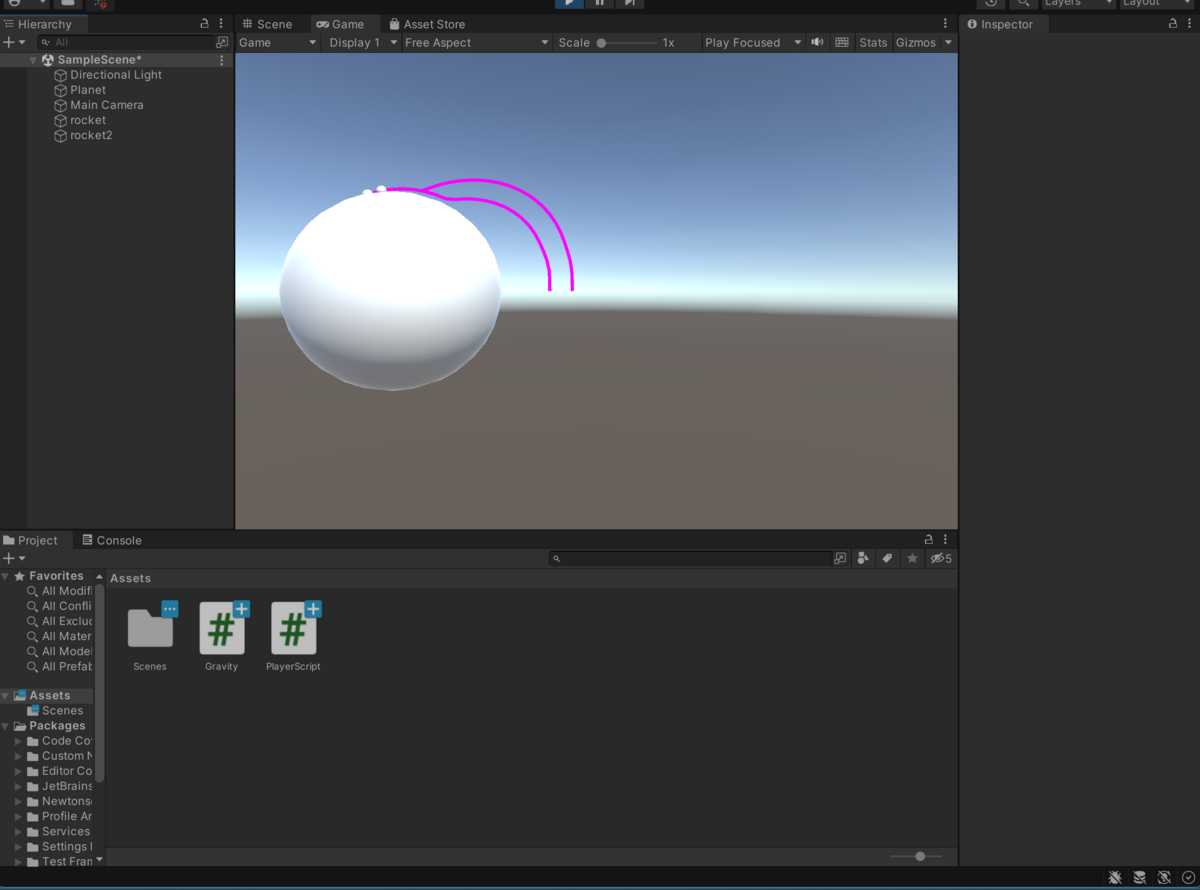
完成図
追記
UpdateじゃなくてFixedUpdateを使うとゲーム内時間で更新されるためラグっても軌道が乱れない