Google Earthの3D建物モデルをダウンロードしBlenderにインポートする
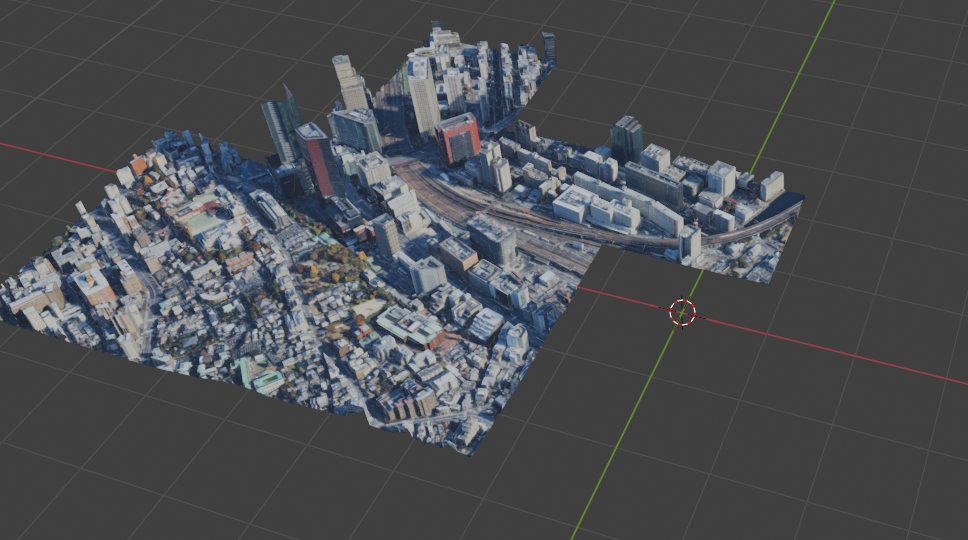
背景
3Dプリンターで都市の立体地図を印刷してみたいと思った。[https://map2model.com/]はおそらくOpenStreetMapから情報を引っ張ってきて指定した範囲のSTLファイルを作れるすぐれものだが、道路と建物の情報しかもっていないので標高情報が反映されず、香港や神戸のような標高が魅力的な都市を再現できない。
また、Google Earthから3DデータをぶっこぬくWebサービスとしては[https://www.openearth.online/earthstudio]があるが、こちらは有料版への誘導がうっとうしく使いにくい。
そこで、RenderDocを用いたGPUのクラッキングを試してみることにした。
参考
[https://zenn.dev/yasako/scraps/502dac4db6c790]
[https://ken26u.blog/3d%E3%83%A2%E3%83%87%E3%83%AA%E3%83%B3%E3%82%B0/blender/2020-02-13-204324/2020/02/13/#toc11]
ダウンロードするもの
- GoogleChromePortable_143.0.7499.170_online.paf.exe
[https://portableapps.com/apps/internet/google_chrome_portable] - RenderDoc v1.25
[https://renderdoc.org/builds] - Blender v4.1.1
[https://www.blender.org/download/release/Blender4.1/blender-4.1.1-windows-x64.msi/] - MapsModelsImporter-v0.7.0.zip
[https://github.com/eliemichel/MapsModelsImporter/releases/download/v0.7.0/MapsModelsImporter-v0.7.0.zip]
手順
RenderDocの準備
- RenderDocをインストール(typicalを選択)
- Tools>Settings Enable prosess injectionにチェックを入れる
- RenderDocを再起動
GoogleChromePortableの準備
- コマンドプロンプトを開く
- 以下のコマンドを入力
C:\Windows\System32\cmd.exe /c “SET RENDERDOC_HOOK_EGL=0 && START “” ^”I:\googledrivemirror\lab\gee\GoogleChromePortable\GoogleChromePortable.exe^” –disable-gpu-sandbox –gpu-startup-dialog –disable_direct_composition=1”
※「I:\googledrivemirror\lab\gee\GoogleChromePortable\GoogleChromePortable.exe」の部分はダウンロードしたGoogleChromePortable.exeのパスに書き換えてください - コマンドを実行
- 2つウィンドウが立ち上がる。大きな方にの裏に隠れている小さいウィンドウの記述「Gpu is starting with pid: (数字)」の数字をメモする
RenderDocによるInjection
- メモした数字をRenderDocのFile>Inject into Process の、「Refresh」と横に表記のある検索欄に入れる。検索結果が出てこない場合はRefreshをクリックする
- 検索結果をダブルクリック(またはInjectをクリック)してInjectionする
GoogleChromePortableでのスクリーンショット撮影
- GoogleChromePortableでgoogle earthにアクセスする
- 建物を3D表示した状態でPrint Screenキーを押しスクリーンショットを撮影する(他サイトではドラッグしながらスクリーンショットを撮影することが推奨されている)
RenderDocでのrdcファイルの保存
- RenderDocのCaptures collected欄に撮影したスクリーンショットが表示される
- 撮影したスクリーンショット上で右クリック>Saveでrdcファイルとして保存
Blenderでの読込み
- Blender 4.1.1をインストールする。言語設定は英語にする
- Edit>Preference Add-onsクリック Installクリック ダウンロードしたMapsModelsImporter-v0.7.0.zipを選択しインストール
- Add-onsでMapsModelsImporterにチェックを入れアドオンを有効化、アドオンの設定画面Temporary Directoryで一時ファイルの保存先を設定する
- File>Import>Google Maps Captureから先ほど保存したrdcファイルを選択、読み込む
躓いた点
- webgl is not supported by your browser: 使っているGoogleChromePortableのバージョンが適切でない
- Error: Failed to load the RenderDoc Module. Please report to MapsModelsImporter developers providing the full console log with debug information. First turn on debug output by activating the “Debug Info”-checkbox under Edit > Preferences > Add-ons > MapsModelsImporter On Windows systems console log is accessible in Windows > Toggle System Console (right click to copy). On Linux systems you have to run Blender from the console to get the debug output: 使っているBlenderのバージョンが適切でない
- 「Gpu is starting with pid: (数字)」のウィンドウが何回も出る: RenderDocのバージョンが適切でない